
Appearance
Plans & pricing
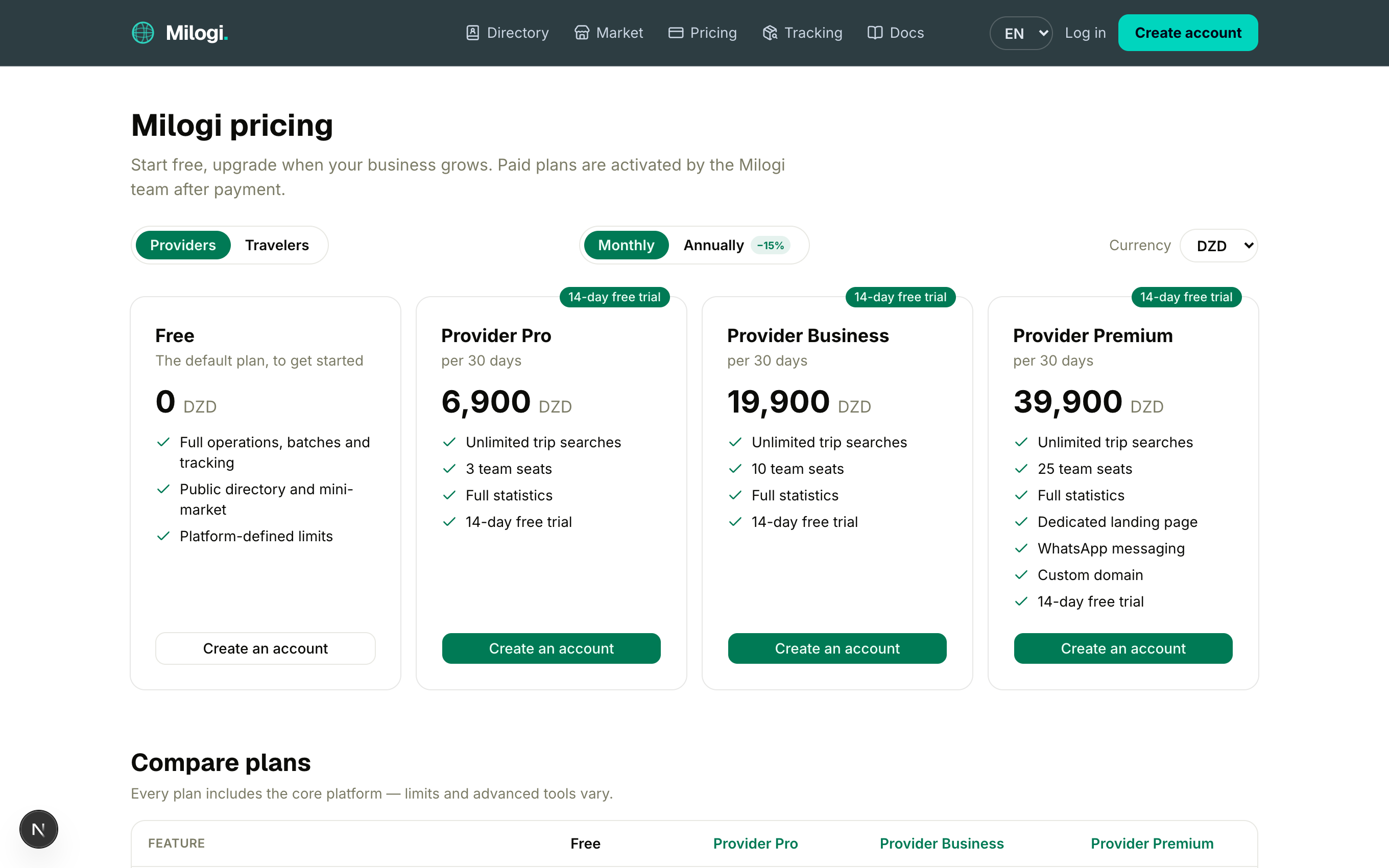
Milogi is free to start. Paid plans lift the platform limits and unlock advanced tools for providers and travelers. Customers never pay a subscription.
The live catalog — names, prices and limits — is always on the Pricing page (/pricing, linked in the header). The Milogi team can adjust it, so treat the tables below as a guide to what each tier is for.
The free plan
Every new provider and traveler is on the Free plan:
- full operations, batches, trips, tracking, QR tickets, directory, market and messaging,
- platform-defined limits set by your user group: requests per month and active operations (customers), trip searches per day and team seats (providers), open trips (travelers),
- basic statistics on the provider dashboard.
When you hit a limit the action is refused with a clear message and a link to the pricing page.
Provider plans
| Pro | Business | Premium | |
|---|---|---|---|
| Trip searches / day | unlimited | unlimited | unlimited |
| Team seats | 3 | 10 | 25 |
| Statistics | full | full | full |
| Dedicated landing page | — | — | ✓ |
| WhatsApp reach | — | — | ✓ |
| Custom domain | — | — | ✓ |
| Priority support | ✓ | ✓ | ✓ |
| Free trial | 14 days | 14 days | 14 days |
Traveler plans
| Plus | Pro | Elite | |
|---|---|---|---|
| Concurrent open trips | 10 | unlimited | unlimited |
| Statistics | full | full | full |
| Dedicated landing page | — | — | ✓ |
| WhatsApp reach | — | — | ✓ |
| Custom domain | — | — | ✓ |
| Free trial | 14 days | 14 days | 14 days |
Which features are "premium"?
Three things are reserved to the top tier (Provider Premium / Traveler Elite):
- Dedicated landing page — your own public showcase at
milogi.dz/@yourname, with templates, services, listings/trips and an AI generator. See Provider showcase or Traveler showcase. - WhatsApp reach — a Chat on WhatsApp button next to your profile in the directory, the market and your showcase.
- Custom domain — serve your showcase from your own domain after a DNS verification.
If the subscription lapses, these switch off automatically (the showcase is unpublished from the public side, the WhatsApp button disappears) — nothing is deleted, and everything comes back when the plan is active again.
Reading the pricing page
- Providers / Travelers toggle — each audience has its own plans.
- Monthly / Annually — annual billing shows the yearly amount with a 15 % discount and the equivalent per month.
- Currency — prices are configured in DZD and, for each plan, in other currencies such as EUR, USD and CNY. Pick yours from the selector; a plan without a configured price in that currency falls back to its base price.
- Compare plans table — feature-by-feature comparison, including the core features every plan shares (operations & dispatch, locations & QR tickets, directory & market, messaging, piece-by-piece tracking).
- Accepted payment methods — listed at the bottom of the page.
Starting a free trial
Every paid plan comes with a 14-day trial, no commitment:
- Log in with the role the plan is for (provider plans need a provider profile, traveler plans a traveler profile).
- On the pricing page click Try free for 14 days on the plan — or use the Try … buttons on the My plan card of your dashboard.
- Your plan card now shows Trial — N days left; the profile page shows the trial end date.
One trial per profile
A profile can start one trial, ever, across all plans. You cannot start a trial while another subscription (trial or active) is live on that profile.
Paying and activating a plan
Milogi does not process card payments in the app. Plan payments are collected off-platform (CCP, bank transfer or cash) and the subscription is then activated or extended manually by the Milogi team. That is why paid plans show Activated by the Milogi team instead of a checkout button. Contact the team (see the Contact page) with your account email and the plan you want.
Your dashboard's My plan card and the profile page tell you where you stand:
| Status | Meaning |
|---|---|
| Free | No subscription — free limits apply. |
| Trial | Trial running; the card counts the days left. |
| Active | Paid period running; the card shows the renewal date. |
| Expired | The trial or the period ended — you are back to free limits until the plan is renewed. |
| Cancelled | Cancelled by the Milogi team. |
Expiry is applied the moment it is observed: the first time you (or anyone) load something that depends on your plan after the end date, the status flips to Expired and you receive an email.
What is checked, and when
| Limit / feature | Checked when… |
|---|---|
| Requests per month, active operations (customer group limits) | a customer sends a new request |
| Trip searches per day | a provider runs a search (each search counts, even with no results) |
| Team seats | a provider adds a staff member |
| Open trips | a traveler publishes a trip |
| Statistics level | the provider statistics page is loaded |
| Landing page, WhatsApp, custom domain | the showcase editor, the public showcase, the directory and the market are loaded |
Team members never consume their own plan: everything is counted on the provider account that owns the workspace.